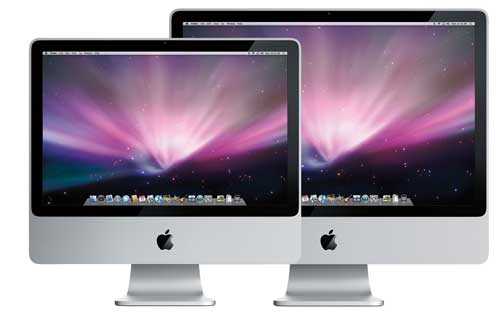
Earlier this week Apple released updated iMacs that, among other things, feature new faster Penryn processors, faster memory, and a faster Santa Rosa chipset.
What do these improvements mean for iMac performance? Let's take a look.
Setup
We used Geekbench 2, our cross-platform benchmark, to measure the processor and memory performance of the new iMacs. Here is the configuration of the four test machines. Note that each machine hasn't been upgraded at all (i.e., it was tested with Apple's default configuration for each model).
iMac (Early 2008)
- Intel Core 2 Duo @ 3.06GHz
- 2.00 GB 800 MHz DDR2 SDRAM
iMac (Early 2008)
- Intel Core 2 Duo @ 2.80GHz
- 2.00 GB 800 MHz DDR2 SDRAM
iMac (Early 2008)
- Intel Core 2 Duo @ 2.66GHz
- 2.00 GB 800 MHz DDR2 SDRAM
iMac (Early 2008)
- Intel Core 2 Duo @ 2.40GHz
- 1.00 GB 800 MHz DDR2 SDRAM
If you’re not familiar with Geekbench 2, scores are calibrated against a baseline score of 1000 (which is the score a Power Mac G5 @ 1.6GHz would receive). Higher scores are better.
Results
Overall Performance
| iMac (Early 2008) Intel Core 2 Duo @ 3.06GHz |
3995 | |
| iMac (Early 2008) Intel Core 2 Duo @ 2.80GHz |
3728 | |
| iMac (Early 2008) Intel Core 2 Duo @ 2.66GHz |
3513 | |
| iMac (Early 2008) Intel Core 2 Duo @ 2.40GHz |
3220 |
Integer Performance
| iMac (Early 2008) Intel Core 2 Duo @ 3.06GHz |
3518 | |
| iMac (Early 2008) Intel Core 2 Duo @ 2.80GHz |
3253 | |
| iMac (Early 2008) Intel Core 2 Duo @ 2.66GHz |
3106 | |
| iMac (Early 2008) Intel Core 2 Duo @ 2.40GHz |
2805 |
Floating Point Performance
| iMac (Early 2008) Intel Core 2 Duo @ 3.06GHz |
5574 | |
| iMac (Early 2008) Intel Core 2 Duo @ 2.80GHz |
5186 | |
| iMac (Early 2008) Intel Core 2 Duo @ 2.66GHz |
4711 | |
| iMac (Early 2008) Intel Core 2 Duo @ 2.40GHz |
4445 |
Memory Performance
| iMac (Early 2008) Intel Core 2 Duo @ 3.06GHz |
3037 | |
| iMac (Early 2008) Intel Core 2 Duo @ 2.80GHz |
2877 | |
| iMac (Early 2008) Intel Core 2 Duo @ 2.66GHz |
2882 | |
| iMac (Early 2008) Intel Core 2 Duo @ 2.40GHz |
2582 |
Stream Performance
| iMac (Early 2008) Intel Core 2 Duo @ 3.06GHz |
2064 | |
| iMac (Early 2008) Intel Core 2 Duo @ 2.80GHz |
1993 | |
| iMac (Early 2008) Intel Core 2 Duo @ 2.66GHz |
2009 | |
| iMac (Early 2008) Intel Core 2 Duo @ 2.40GHz |
1665 |
Conclusions
One question I'm always asked after publishing benchmarks like this is whether it's worth getting the high-end model or not. Usually the answer comes down to personal preference and budget; in other words, the answer is "it depends". To help answer that answer this time around I thought I'd try something new; I divided the cost of each iMac by its Geekbench score, coming up with a "Cost Per Point" metric. Below is a chart that lists the Cost Per Point (in cents) for each model, including the base model with a 2GB RAM upgrade. Lower, in this case, is better:
| iMac (Early 2008) Intel Core 2 Duo @ 3.06GHz |
55 | |
| iMac (Early 2008) Intel Core 2 Duo @ 2.80GHz |
48 | |
| iMac (Early 2008) Intel Core 2 Duo @ 2.66GHz |
43 | |
| iMac (Early 2008) (with 2GB) Intel Core 2 Duo @ 2.40GHz |
40 | |
| iMac (Early 2008) (with 1GB) Intel Core 2 Duo @ 2.40GHz |
37 |
If you're looking for the best value in terms of raw processing power, the best iMac to get is the base model. Even after upgrading the RAM in the base model it's still more cost-effective than the mid-range 20-inch iMac.
That said, this analysis only takes processor and memory performance into account. It doesn't take into account the extra features you get with each model, like larger hard drives and better video cards. Personally, I'd recommend the 2.66 GHz 20-inch iMac; the extra hard drive space and video memory offset the slight disadvantage it has against the 2.4 GHz 20-inch iMac in terms of value.
Update: A number of folks have pointed out that this comparison doesn't take into account the differences in screens between the 20-inch and 24-inch iMacs; not only is the 24-inch iMac larger, but it also comes with a better display capable of showing more colors. This was something I thought about when I was writing this post, and I came to the conclusion that if you want larger or better screen, you're going to get it. You're not going to even consider the 20-inch iMac. You'll probably want to know whether it's worth getting the high-end 24-inch iMac, a decision that's hopefully made easier with the above charts!